Create Invoice
The Create Invoice page is used to create a new invoice, edit an existing invoice, or duplicate an invoice.
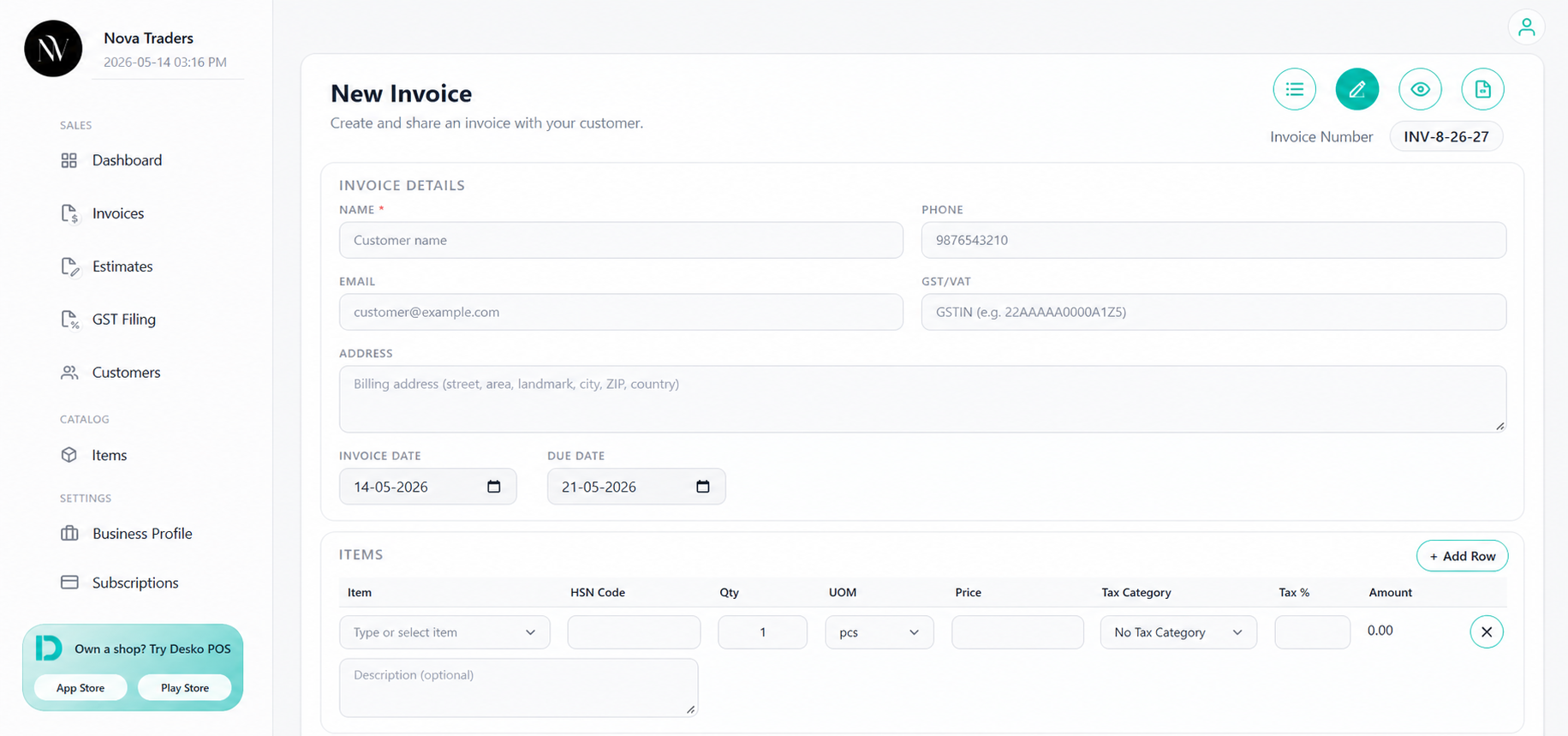
Page access
| Mode | Path/behavior |
|---|---|
| New invoice | Open Create Invoice from the invoice list or dashboard. |
| Edit invoice | Opens with an existing invoice number using edit mode. |
| Duplicate invoice | Creates a copy of an existing invoice and resets payment-linked state. |
| Preview mode | See the final appearance of the document before sharing, printing, or downloading it. |
Invoice number
Invoice numbers are generated from Business Profile > Document Settings.
The system uses:
- Prefix
- Separator
- Postfix
- Pad width
- Last number
- Latest existing invoice number as fallback protection
Example:
INV-31The app protects against duplicate invoice numbers by retrying with the next available number if needed.
Invoice details
The invoice header includes:
- Invoice number
- Invoice date
- Due date
- Status
- Customer/receiver information
Due date is important because reminders and overdue status depend on it.
Customer details
Users can select an existing customer or create a new customer.
Fields:
- Name
- Phone
- GST/VAT number
- Billing address
If a new customer is entered, the app can save that customer for future use.
Line items
Each item row supports:
| Field | Description |
|---|---|
| Item | Select saved item or type a new one. |
| Description | Optional item description. |
| Qty | Quantity. |
| UOM | Unit of measure such as pcs, kg, g, l, ml, m, cm, sqft, box, pack, dozen. |
| Price | Unit price. |
| HSN Code | Item-level HSN/SAC code (India). |
| Tax Category | Saved tax category such as GST/VAT/IGST. |
| Tax % | Manual or category-derived tax rate. |
| Amount | Calculated line amount. |
Create new item from invoice
Users can create a new item directly while creating an invoice.
The item can include:
- Name
- HSN code(India)
- Price
- Tax category
- Tax percentage
- Unit
- Description
Create tax category from invoice
If the required tax category is not available, users can create a new tax category from the invoice form.
Discounts
The invoice supports discount by:
- Amount
- Percentage
Percentage discounts are limited to a valid range and cannot exceed 100%.
Totals block
The summary calculates:
- Subtotal
- Discounts
- Taxable amount
- Taxes
- Round off
- Grand total
Round-off and settlement adjustments are handled separately so the final total remains clear.
Notes and terms
Users can add invoice notes. Business-level invoice terms from Business Profile are also included when saving the invoice.
Typical note:
Thank you for your business. Payment due within 7 days.Status selection
The invoice form supports these direct status options:
- Draft
- Sent
- Paid
- Cancelled
Payment tracking can later update status to:
- Partially Paid
- Overdue
Autosave
The invoice builder autosaves meaningful invoice changes to prevent data loss.
Autosave is skipped for empty drafts and avoids unnecessary saves when nothing has changed.
Paid invoice lock
When editing an already paid invoice, payment-linked fields should be treated carefully. The current app detects paid invoices and locks/restricts some editing behavior to avoid incorrect payment state.
AI assistant
If the AI add-on is active, the invoice page can show an AI assistant.
Supported AI actions include invoice/item/customer/tax/discount updates such as:
- Create invoice draft
- Add item
- Update item
- Delete item
- Add tax
- Update tax
- Remove tax
- Update customer
- Apply discount
- Remove discount
Main actions
| Action | Meaning |
|---|---|
| Invoice List | Go back to invoice list. |
| Preview | Open document preview. |
| Overview | Open invoice overview after saving. |
| Duplicate | Copy invoice into a new draft. |
| Clear | Reset the form. |
| Save | Save invoice to database. |
Watch the demo video below to learn the invoice creation process
Best practices
- Complete Business Profile before creating invoices.
- Use saved customers and saved items to reduce mistakes.
- Use tax categories instead of typing tax every time.
- Always preview PDF before sending to a customer.
- Avoid changing paid invoices unless the business process requires it.