Customers
The Customers page stores customer records that can be reused across invoices, estimates, payments, and other business documents.
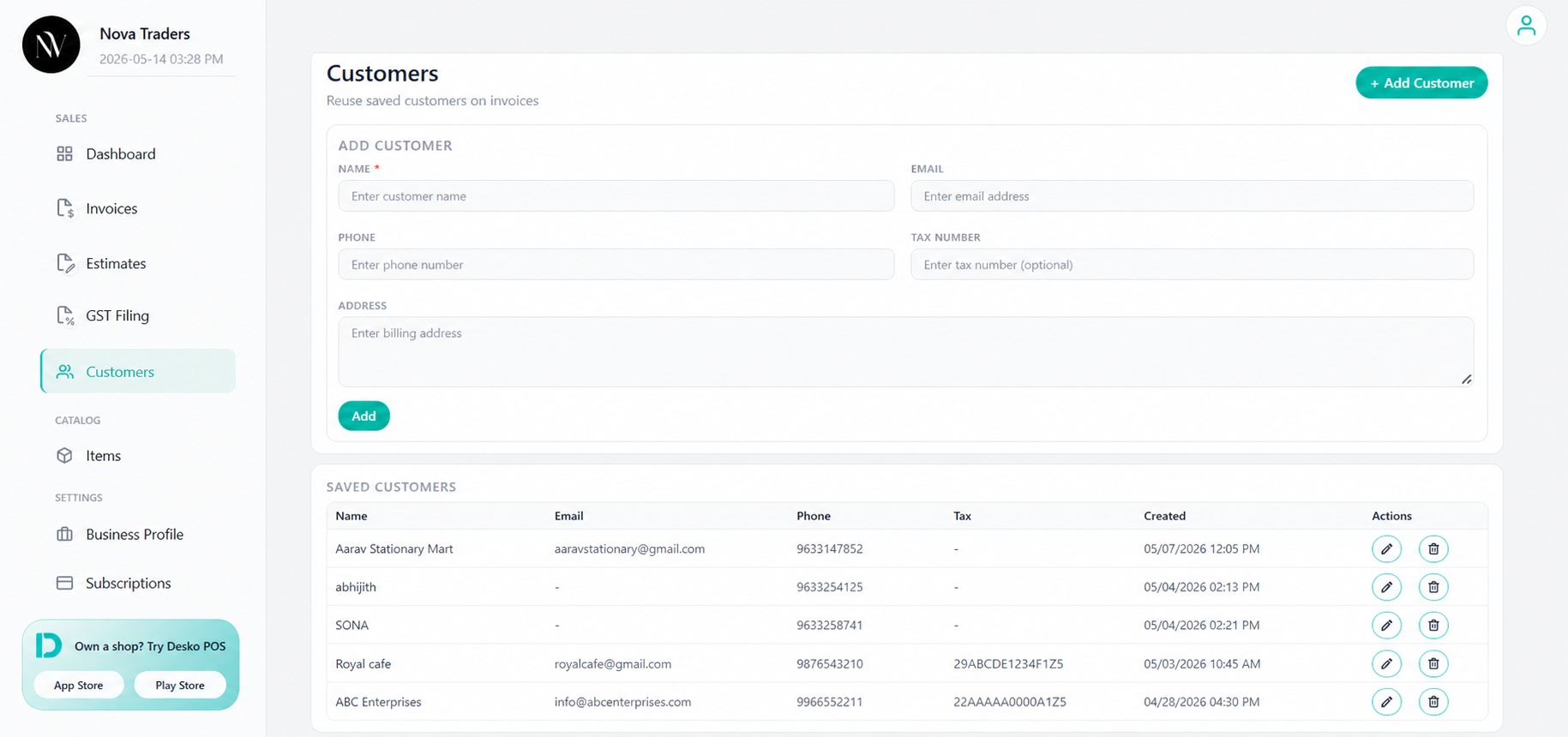
Customer fields
| Field | Purpose |
|---|---|
| Name | Used as customer/receiver name in invoice and estimate. |
| Used for sending documents and email reminders. | |
| Phone | Used for contact details and possible WhatsApp reminder flow. |
| Tax number | Used for GST/VAT compliance and B2B classification. |
| Address | Used in PDF billing address. |
Add customer
- Open Customers.
- Enter name.
- Add email, phone, tax number, and address.
- Click Add.
Edit customer
Use edit when customer billing details change.
Delete customer
Deleting a customer removes it from saved customer records. Existing invoices keep the customer snapshot already stored inside invoice data.
Use customer in invoice/estimate
When creating an invoice or estimate:
- Select customer from the customer dropdown/search.
- Receiver fields are filled automatically.
- You can still adjust details for that specific document.
Validation
- Name is required.
- Email must be valid when provided.
- Phone must be valid when provided.
Best practices
- Save tax number for B2B/GST customers.
- Save email for invoice sending and reminders.
- Avoid duplicate customers by searching before adding.