Invoice List
The Invoice List is the primary workspace for managing invoices. From here, you can view invoice details, monitor statuses, search for specific invoices, apply filters, and perform invoice-related actions.
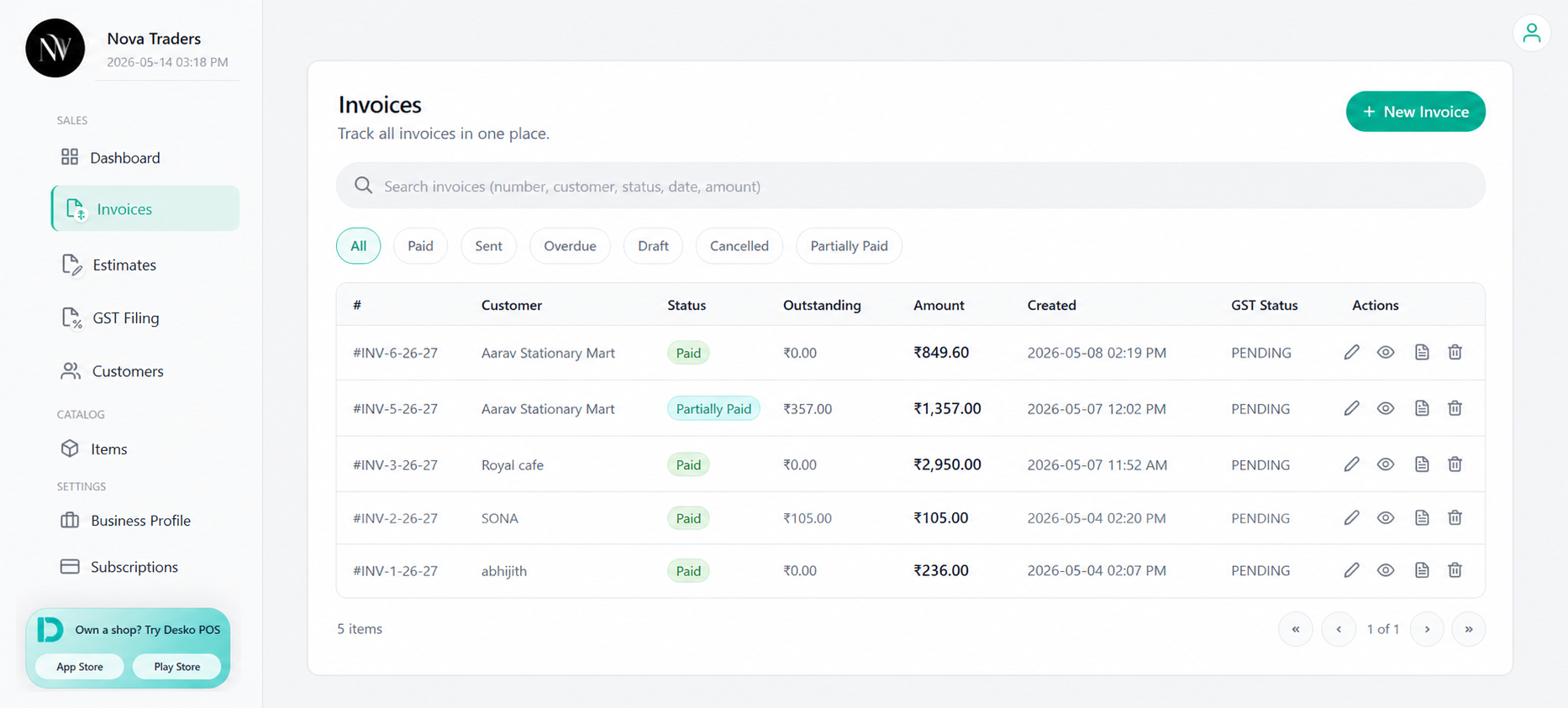
What users can do
From the Invoice List, users can:
- Create a new invoice
- Search invoices
- Filter by status
- Open invoice overview
- Open preview
- Edit an invoice
- Delete an invoice
- Track outstanding amounts
- View GST status
- View ZATCA status
Search
Use the search box to quickly find records in the system. You can search using:
- Invoice number
- Customer name
- Status
- Date
- Amount
Status Filters
Use status filters to quickly find invoices based on their current state.
Available Filters
- All – Displays all invoices.
- Paid – Shows invoices that have been fully paid.
- Sent – Shows invoices that have been sent to customers.
- Overdue – Shows invoices that have passed their due date and remain unpaid.
- Draft – Shows invoices that have been created but not yet finalized or sent.
- Cancelled – Shows invoices that have been cancelled and are no longer active.
- Partially Paid – Shows invoices that have received a partial payment and still have an outstanding balance.
Select a status filter to narrow down the invoice list and quickly locate the invoices you need.
Invoice table columns
| Column | Description |
|---|---|
| Customer | Customer name from invoice receiver details. |
| Status | Current invoice status. |
| Outstanding | Balance remaining after recorded payments. |
| Amount | Invoice grand total. |
| ZATCA Status | ZATCA submission/clearance status if enabled. |
| GST Status | GST filing status if GST add-on/data is available. |
| Created | Created date. |
| Actions | Edit, preview, overview, delete. |
Common Actions
Overview
Opens the invoice overview page, where you can view invoice details, record payments, send reminders, manage settlements, and access receipts.
Preview
Opens the invoice preview page. Use this page to review the invoice layout, download a PDF, print the invoice, or share it with customers.
Edit
Opens the invoice editor with the existing invoice data, allowing you to update customer information, invoice items, taxes, notes, and other details.
Delete
Permanently removes the invoice from the active invoice list. This action cannot be undone.