Dashboard
The dashboard gives a quick business summary before opening the invoice list.
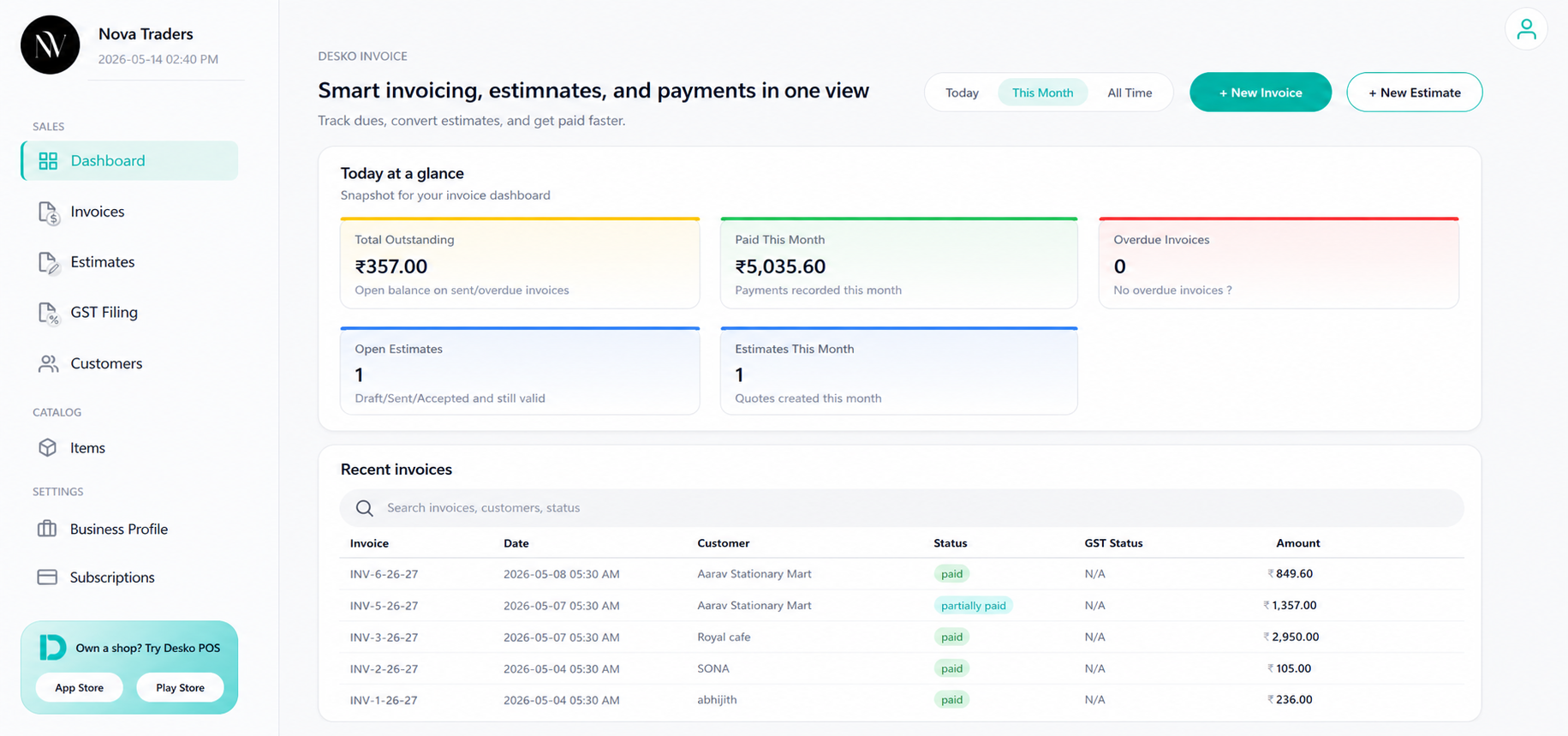
What the dashboard shows
| Metric | Meaning |
|---|---|
| Total Outstanding | Open balance on invoices that are sent, partially paid, or overdue. |
| Paid | Payments recorded for the selected range. |
| Overdue Invoices | Invoices past the due date and not fully paid. |
| Open Estimates | Draft, sent, or accepted estimates that are still valid. |
| Estimates | Quotes created in the selected range. |
Date range filters
The dashboard supports:
- Today
- This Month
- All Time
Use these filters to quickly check daily collections, monthly billing, or total performance.
Recent invoices table
The recent invoices section helps users review invoice activity without opening the full invoice page.
It can show:
- Invoice number
- Date
- Customer
- Status
- GST status
- ZATCA status
- Amount
Quick actions
| Action | Use |
|---|---|
| New Invoice | Start a new invoice. |
| New Estimate | Start a new quote/estimate. |
| View | Open invoice overview. |
| Mark paid | Quickly mark a valid invoice as paid. |